Open regedit and create new KEY SpecialAccounts\UserList in HKEY_LOCAL_MACHINE\SOFTWARE\Microsoft\WIndows NT\CurrentVersion\Winlogon by right-clicking the Winlogon folder in the left panel.
In this new subkey (UserList) right-click to create a DWORD value with name of the account you want to hide.
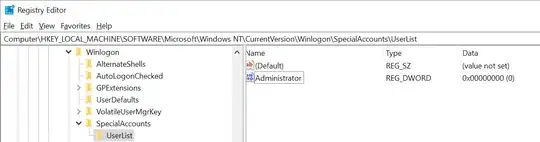
To show the account again, remove the DWORD, or alternatively you can set a value of the DWORD to
0 (default when created) to hide 1 to show the account again
You can immediately test that it works by pressing Win+L.

PS: This answer really is just a copypasta from this burried question at answers.microsoft.com enhanced with my own screenshots to help basic users.
You can read more related information in these SO QAs
How to hide admin account and only show main user at logon screen in Windows?
Hide account from login screen but can be used in UAC


