What does it mean to sign an assembly? And why is it done?
What is the simplest way to sign it? What is the .snk file for?
What does it mean to sign an assembly? And why is it done?
What is the simplest way to sign it? What is the .snk file for?


The other two answers are fine, but one additional point. It is easy to get confused between "certificate" signing and "strong name" signing.
The purpose of strong name signing is as Stefan Steinegger says: to allow your customer to establish that the code they THINK they're loading really is precisely the code that they ARE loading. That is ALL strong names are for. Specifically, strong names do not establish any kind of trust relationship between your customer and you. If the customer decides that they trust code that comes from you, it is up to THEM to figure out exactly what the correct strong name is for your code. The "key management" problem is not in any way solved; the customer has the burden of figuring out how to know what key to trust.
Certificate signing, that is, signing with a certificate you get from Verisign or some other certifying authority, has a much more complex purpose. The purpose of certificate signing is to establish an authenticated chain of trust and identity from the certifying authority down to the organization which signed the code. Your customer might not trust you, your customer might not have even heard of you, but your customer can say "if Verisign vouches for the identity of the author of this code, then I will trust them". The key management problem is reduced for the customer because the certifying authority has taken on that burden for them.


To sign an assembly is to give the assembly a strong name.
First, let's make an important distinction. One way to categorize assemblies in .NET is as follows:
Why? Having a strong name guarantees that your assembly is unique and that nobody can steal the GUID (as in COM) to create a different object with the same name. In other words, you are ensuring that when you load a signed assembly, you are loading exactly what you think you are loading. Eric Lippert offered a great answer to this particular question here.
This is not the same as saying that a signed assembly can be trusted. For that, an assembly can include Authenticode, a digital signature to provide information about the assembly developer/company.
The following is the short version of the MSDN step-by-step:
Create a strong key using SN.EXE
sn -k C:\mykey.snk
From Visual Studio, on your project Properties page, go to the Signing tab, and check on "Sign the assembly" to pick the file just created
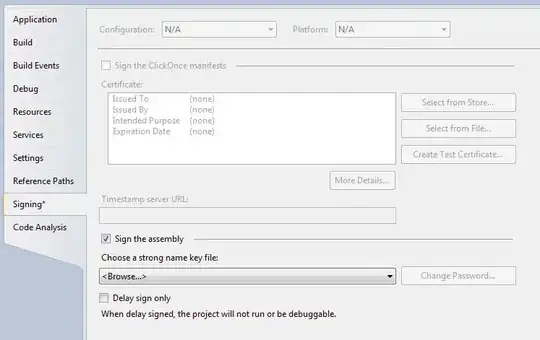
Rebuild your project, and voila. Your assembly is now signed. You can see this in the CSPROJ file of your project:
<PropertyGroup>
   <SignAssembly>true</SignAssembly>
</PropertyGroup>
<PropertyGroup>
   <AssemblyOriginatorKeyFile>mykey.snk</AssemblyOriginatorKeyFile>
</PropertyGroup>
The SNK is the 'Strong Name Key' file.


It means to give the assembly a unique identity. This is done so there exists a guarantee that an assembly came from a particular source. See the MSDN article Strong-Named Assemblies. A strong-named assembly supports Side by Side Execution, Assembly placement in the GAC, Versioning, and a few other features.
The simplest way to sign is using the project properties in Visual Studio, the signing tab. This actually adds an XML entry in the .csproj file that tells the build engine to sign the assembly with said key file. The key file is this ".snk" file we are speaking off. It is generated using the sn.exe .NET tool. It contains all information necesary to sign an assembly.

Signing is there to prove that the assembly is created by a known person or company, and not changed by anyone else.
When signing an assembly a hash is created and signed with a private key. If the assembly is changed, for instance by malware, it is easy to find out by checking the hash and the signature using the public key (which is included in the assembly).
Signing the assembly is therefore to protect the target system from being hacked. You could turn off signature checks in the .NET configuration. It is in the interest of the end user to have signatures checked. Signatures are checked when loading assemblies.
The snk file holds the private key to sign the assembly, and the public key to check it. It needs to be protected. If someone gets your private key, he could sign assemblies as if they where signed by you.
The simplest way to sign it is to choose the snk file within the project settings.
