The best solution I could find requires three helper functions.
TransparentToOpaque changes all fully transparent pixels to opaque.
procedure TransparentToOpaque(bmp: TCustomBitmap32);
var
  I: Integer;
  D: PColor32Entry;
begin
  D := PColor32Entry(@bmp.Bits[0]);
  for I := 0 to bmp.Width * bmp.Height - 1 do begin
    if D.A = 0 then
      D.A := $FF;
    Inc(D);
  end;
  bmp.Changed;
end;
FlipTransparency changes all fully transparent pixels to opaque and vice versa.
procedure FlipTransparency(bmp: TCustomBitmap32);
var
  I: Integer;
  D: PColor32Entry;
begin
  D := PColor32Entry(@bmp.Bits[0]);
  for I := 0 to bmp.Width * bmp.Height - 1 do begin
    if D.A = 0 then
      D.A := $FF
    else if D.A = $FF then
      D.A := 0;
    Inc(D);
  end;
  bmp.Changed;
end;
MakeOpaque marks all pixels as opaque.
procedure MakeOpaque(bmp: TCustomBitmap32);
var
  I: Integer;
  D: PColor32Entry;
begin
  D := PColor32Entry(@bmp.Bits[0]);
  for I := 0 to bmp.Width * bmp.Height - 1 do begin
    D.A := $FF;
    Inc(D);
  end;
  bmp.Changed;
end;
Following tricks can then be applied.
After drawing text on the main image bmp1 which doesn't contain transparent pixels, code calls TransparentToOpaque to prevent problems with blending later on.
When drawing on a (semi)transparent bitmap bmp2, code creates yet another bitmap bmp3 and fills it with an opaque version of that (semi)transparent bitmap. This will ensure that font is aliased to correct colors in the TextOut call.
After the TextOut bmp3 contains opaque background and transparent text. FlipTransparency is then called to generate opaque text on a transparent background.
bmp3 is blended onto bmp2. This gives up opaque text on a (semi)transparent background.
bmp2 is blended onto bmp1.
Example code:
procedure TForm53.DrawBitmaps;
var
  bmp1: TBitmap32;
  bmp2: TBitmap32;
  bmp3: TBitmap32;
begin
  bmp1 := TBitmap32.Create;
  bmp1.Width := 100;
  bmp1.Height := 100;
  bmp1.FillRect(0, 0, 100, 100, clWhite32);
  bmp1.FillRect(0, 0, 80, 80, clTrGreen32);

  bmp1.Font.Size := -16;
  bmp1.Font.Color := clBlack;
  bmp1.TextOut(2, 10, 'Green');

  //Mark all fully transparent pixels (generated with TextOut) as opaque.
  TransparentToOpaque(bmp1);

  SaveBitmap32ToPNG(bmp1, 'c:\0\bmp1a.png');

  bmp2 := TBitmap32.Create;
  bmp2.Width := 80;
  bmp2.Height := 80;
  bmp2.FillRect(0, 0, 80, 80, clTrRed32);

  //Create bitmap, large enough to contain drawn text (same size as original bitmap in this example).
  bmp3 := TBitmap32.Create;
  bmp3.Width := bmp2.Width;
  bmp3.Height := bmp2.Height;

  //Copy `bmp2` to `bmp3`.
  bmp2.DrawMode := dmOpaque;
  bmp2.DrawTo(bmp3, 0, 0);

  //Mark all pixels as opaque (alpha = $FF)
  MakeOpaque(bmp3);

  //Draw text on `bmp3`. This will create proper aliasing.
  bmp3.Font.Size := -16;
  bmp3.Font.Color := clBlack;
  bmp3.TextOut(2, 50, 'Red');

  //Make all fully transparent pixels (TextOut) opaque and all fully opaque pixels
  //   (background coming from `bmp2`) transparent.
  FlipTransparency(bmp3);

  SaveBitmap32ToPNG(bmp3, 'c:\0\bmp3a.png');

  //Blend `bmp3` on semi-transparent background (`bmp2`).
  bmp3.DrawMode := dmBlend;
  bmp3.DrawTo(bmp2, 0, 0);

  SaveBitmap32ToPNG(bmp2, 'c:\0\bmp2a.png');

  //Blend background + text onto main image.
  bmp2.DrawMode := dmBlend;
  bmp2.DrawTo(bmp1, 20, 20);

  SaveBitmap32ToPNG(bmp1, 'c:\0\bmpcombineda.png');

  bmp1.Free;
  bmp2.Free;
  bmp3.Free;
end;
Resulting images:
bmp1a:  bmp2a:
  bmp3a:
  bmpcombineda: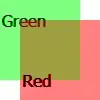
 bmp2:
bmp2:  bmpcombined:


