16

I have a very simple javascript code,

<script language="javascript">          
         function RunExe()   
         {  
           w = new ActiveXObject("WScript.Shell");
           w.run('notepad.exe');
           return true;

         }  
</script>
    <form id="form1">
    <div>
      <input type="button" value="Run" onclick="return RunExe()" />
    </div>
    </form>

Which create an activeX object to run notepad.exe, if I save this in a plain html and run it in the IE, it works fine opening up the notepad, but if I insert this into a aspx page and run it, it will give an error called "Automation server can't create object", I googled it many times, but the IE security things I have already done and I think it's something in ASP or IIS which I couldn't figure out.

Your suggestions and inputs are highly appreciable.

Thanx

epascarello
  • 204,599
  • 20
  • 195
  • 236
Asanka
  • 539
  • 3
  • 6
  • 14
  • 1
    Has nothing to do with IIS or the serverside in general, seems like .NET guys always blame IIS or the serverside code owhen it comes to browser issues. :) Removed bad tags. – epascarello Nov 11 '10 at 12:27
  • but I hardly think that it is a browser issue, since I can run the same code when it is included in a normal html code, which I have already mentioned in the problem. that's why I suspect it to be a issue other than the browser security – Asanka Nov 12 '10 at 04:07
  • @Asanka ActiveX issues usually are browser security related. – Nielsvh Mar 16 '18 at 15:18

6 Answers6

26

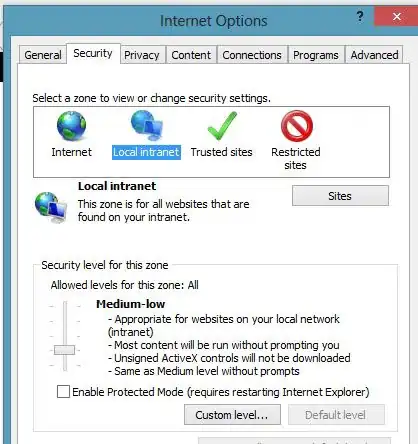
This is caused by Security settings for internet explorer. You can fix this,by changing internet explorer settings.Go To Settings->Internet Options->Security Tabs. You will see different zones:i)Internet ii)Local Intranet iii)Trusted Sites iv)Restricted Sites. Depending on your requirement select one zone. I am running my application in localhost so i selected Local intranet and then click Custom Level button. It opens security settings window. Please enable Initialize and script Activex controls not marked as safe for scripting option.It should work.

enter image description here

enter image description here

Chandra Malla
  • 2,399
  • 22
  • 12
13

For this to work you have to really, really loosen your security settings (generally NOT recommended)

You will need to add the website to your "Trusted Zone", then go into the custom settings (scroll about 1/2 way down the page) and change:

ActiveX controls and plugins - Enable (or prompt)... any of the settings that apply to your code (I think the very last one is the one you are hitting) -- "script ActiveX controls marked safe for scripting*"

That all said, unless you have a really, really good reason for doing this - you are opening up a major "hole" in your browsers security... step very carefully... and do not expect that other end users will be willing to do the same.

scunliffe
  • 62,582
  • 25
  • 126
  • 161
  • yes, but I have already enable those settings (that's why the normal html page's activex control works fine, as I mentioned in the question...), this problem occurs when I insert this script in an aspx page which resides under IIS. any ideas?... – Asanka Nov 12 '10 at 03:41
  • 3
    @Asanka - As mentioned by @epascarello there is nothing in the code snippet that would be affected by the web/app server you are using. If the output of the script tag makes it to the HTML as you've indicated above then whether or not it executes correctly is **entirely** dependent on the browser. You will get the "can't create" error if the script executes... but you can't create the ActiveX object. There should only be 2 reasons why you can't... 1.) the object type doesn't exist (e.g. a typo in the name) or 2.) you don't have permissions for *this* user, on *this* site, in *this* zone. – scunliffe Nov 12 '10 at 13:31
7

i also have same problem and solve it. Please go through the link

add your site to trusted zone and change following options in ie Tools Menu -> Internet Options -> Security -> Custom level -> "Initialize and script ActiveX controls not marked as safe for scripting"

http://forums.codeguru.com/showthread.php?t=256114

Dafy Sequera
  • 71
  • 1
  • 1
7

Well you can not run code from notepad so that means you are opening up the page from the file system. aka c:/foo/bar/hello.html

When you run the code from the asp.net page, you are running it from localhost. aka http://loalhost:1234/assdf.html

Each of these run in different security zones on IE.

epascarello
  • 204,599
  • 20
  • 195
  • 236
1

I have the same problem , it solved by registering the dll

at project properties => build => register for COM interop => check it

Mandoleen
  • 2,591
  • 2
  • 20
  • 17
-1

This error is cause by security clutches between the web application and your java. To resolve it, look into your java setting under control panel. Move the security level to a medium.

Anele
  • 1