-3

I understand that this is a broad question, and I am trying to avoid asking a question that has intinite answers, but, there has to be a standard set of standard rules when designing an Access database for a server which I am missing.

The Reason I am asking is because I currently have a database, which started as a desktop app, and I now want to move it onto a server. However, I basically created this database on-the-fly, and currenty in debate of scrapping the front-end of the database because I feel like I am missing crucial steps on the development end. I really need an expert's opinion on the basic How-To's on structuring a server-based database.

Thank you for your time and consideration.

EDIT Here is a link to a great guideline which lays out the 'best practices' when making a server-based Access database.

http://www.opengatesw.net/ms-access-tutorials/Access-Articles/MSAccess-Deployment-Best-Practices.htm

Hope others find this as useful as I have.

Dylan
  • 81
  • 1
  • 2
  • 10
  • The first recommendation I have to offer is not to use ms-access, it doesn't scale at all to large requests and can't handle multiple requests at once like a server often will. The second recommendation is to start mapping out what you need to store in a big list, then start normalizing your data and adding keys where you need to. By the time you've finished normalising your list you'll have a nice collection of tables and keys and should be in a safe position to start assigning names to the tables and such. – scragar Sep 12 '14 at 15:12
  • Excellent advice, I really appreciate it. I was in debate about using ms-access for a server database aside from a desktop database, and now I know I should scrap ms-access. I'll do some more research on what to use when designing a sever-based database. And I totally agree, I completely missed mapping out my data! Thanks again for the opinion! – Dylan Sep 12 '14 at 15:19
  • 3
    @scragar If by "not ... use ms-access" you mean "don't use an Access database file as the back-end" then you may have a point, depending on the number of concurrent users, size of the database file, etc.. However, your claim that the Access Database Engine "can't handle multiple requests at once" is simply not true. Also, Access could be used to build the front-end application even if the back-end database was SQL Server (or perhaps some other client-server database product). – Gord Thompson Sep 12 '14 at 15:36
  • 2
    @GordThompson In theory it supports up to 255 connections, in reality it's going to start choking on more than 5 or 10 if they're performing writes(obviously depending on the scale of what they're doing). If you want a server for something odds are you're planning at some point in the future to have a dozen people using it(or at the very least would like the option). – scragar Sep 12 '14 at 15:44
  • I might be able to dodge a bullet with this one because I believe there will be only four people accessing this database at once. It's a relatively small database. I appreciate all your guys' thoughts on this and I am definitely taking notes. I know this is off-topic to what my question is, but, given the input thus far, what should I use to construct a small server-based database (i.e: mySQL, VisualStudio)? – Dylan Sep 12 '14 at 16:30
  • But scragar the WHOLE question here is about using SQL server for the back end. That being the case, then using MS Access for the front end is moot. You don't by "magic" get improved performance just because .net requests SQL server for some data or we have MS Access request data from SQL server. So Access is a great choice and match for SQL server back ends. And when such a choice is made then the issue of users and scalability becomes that of SQL server and not Access. – Albert D. Kallal Sep 15 '14 at 00:06
  • A good possible suggestion here is to use MS Access as the front end to SQL server. So you need to adopt the SQL server management tools. You then up-size your tables from Access to SQL server. Your existing forms, VBA code etc. will in general continue to work without any changes. So the fact that someone here is suggesting you use SQL server dos NOT mean you need nor have to dump using Access. You use Access to build the user interface and you can keep + use your existing forms. – Albert D. Kallal Sep 15 '14 at 00:08

1 Answers1

0

There not any real changes in good designs you have in an existing Access application as opposed to using Access + SQL server.

In other words you can take your existing application and move the data tables to SQL server, and CONTINUE to use your existing Access application as a front end.

There no real advice here that applies to "only" Access without SQL server and that of using Access + SQL server. In other words, you don't really have to change how you build your Access application to work with SQL server.

Good designs that scale and work well in an Access only applications ALSO tend to work rather well when using Access as the front end and SQL server for the back end.

The basic tips are:

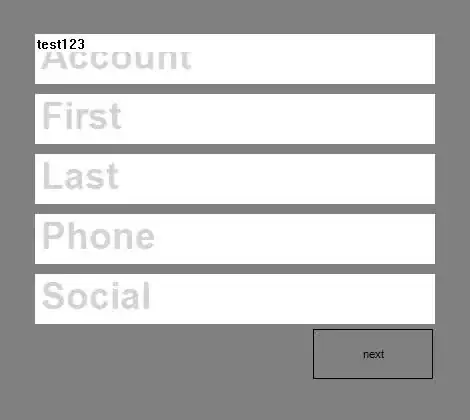
When you open a form, ASK the user BEFORE you launch the form. It makes no sense to launch a form that drags large numbers of records from the server and THEN ask the user what account# or whatever is required. So prompt the user for some type of search. Say a screen like this:
enter image description here

The above even when hitting SQL server with a million rows is INSTANT. And above uses 100% linked tables from Access without any special tricks here - just a simple SQL statement gets shoved into the sub form. So this is a linked view to SQL server.

Then when the user clicks on a row, you simply launch the form with a where clause ("ID = " & me!id).

This "where" clause works fine even with Access bound forms and linked tables too SQL server.

Use Views for complex queries in reports (that have client side filter requests).

And you can adopt pass-though queries for some reports for even greater performance, but in most cases creating views SQL side and linking to them from Access works well and is the least amount of work.

So there no real "changes" in how you develop your software with Access and SQL Server. The only issue is ALWAYS keep in mind that you do not want to load records into a form until such time you determined what the user wants to edit. This approach not only applies when using Access + SQL server, but even with just file based Access applications you don't need nor want to pull records unnecessary into a form to reduce network load.

A "simple" where clause attached to the OpenForm command will suffice in the vast majority of cases.

So there no "real" change in how you develop a good Access only application, or a Access + SQL server applcation.

Albert D. Kallal
  • 42,205
  • 3
  • 34
  • 51
  • The only difficulty I have is the fact that the database I've developed consists of 3 smaller databases and their management overview. For example, I have a database that manages tools and equipment and another one which handles Rolling Stock. Also, I have two other databases, first manages the maintenance to the above databases, and another one manages order requests for the above. For the most part, they communicate with one another(i.e: orders and maintenance on a brad nailer can be seen on a form with subforms), All linked via NavForm. Am I still able to bring these up to a server? – Dylan Sep 15 '14 at 14:28
  • I don't see anything in your comments that really changes anything as to how such database setups work. You thus need to split your database(s). So user interface part will not have the data tables, but only links. And linking to different databases does not change much and it sounds like you been using the linking feature of Access anyway. So if this setup results in 3 different databases then any front end can link to such databases (be they Access back ends, or SQL back ends). – Albert D. Kallal Sep 16 '14 at 23:40
  • I shall keep this in mind. I have bought a book that goes into detail on the specific steps to take when converting a desktop database into a server-based database. Right now I am just placing my error traps and finding a way to keep people from entering in duplicate/incorrect records. Coding, coding, coding. – Dylan Sep 17 '14 at 15:51
  • Excellent. As a follow up 99% of your existing code should work fine. The fact that the tables are now SQL server changes little. So any “coding” required will in general not change because your tables now reside on SQL server as opposed to a Access table. The forms, and VBA code you write in general should not have to be changed because the table is now on SQL server as opposed to an Access table. Good luck! – Albert D. Kallal Sep 18 '14 at 22:26
  • This is definitely a relief! My friend and I are going to sit down next week and get this database onto a server(or at least be ready to go on a server) and go from there. Thanks again for the advice! – Dylan Sep 18 '14 at 23:15