There are numerous issues with your SDEF file.
While this isn't a major issue, when defining your own "types" (OSType codes), all lowercase letters are historically reserved for Apple. So, you should do something like 'Smas' or 'sMas' but not 'smas'.
It may have been a typo here in the web browser, but you misspelled inhereits in the line <class name="application" code="smaa" inhereits="application".... It's important that the spelling is correct so that you can properly "extend" the base AppleScript application class with your own additional properties. This may be the reason why you're only seeing the default application properties in AppleScript Editor. (While correcting the spelling alone may allow things to work, there are other corrections you should make as well).
You're trying to specify that the Cocoa class for your "extended" application AppleScript class is AppDelegate, but this is problematic because AppDelegate does not inherit from NSApplication like specified in Apple's example .sdef, rather, it inherits from plain-old NSObject.
Before moving on to how I would re-write the SDEF, I'll review what the basic idea is behind how Apple's example SDEF works to add custom properties to the default AppleScript application class. The AppleScript application class corresponds to the NSApplication Cocoa class. When you launch your application, OS X creates an instance of NSApplication (or a subclass thereof, as specified by the NSPrincipalClass entry in the app's Info.plist file). This instance manages the application. In Cocoa, there are 2 possible ways to add the additional AppleScript properties to the existing NSApplication class: 1) create a custom subclass of NSApplication which contain the additional properties or 2) use an Objective-C category to extend the existing NSApplication class as-is. (In Cocoa, Objective-C categories are a way to add additional functionality to an existing class without the potential complexities that subclassing introduces). Apple's SimpleScripting example uses the latter approach (Objective-C categories) to add the additional functionality.
Below is how I would rewrite the SDEF.
SimpleScriptingAppDelegate.sdef:
<?xml version="1.0" encoding="UTF-8"?>
<!DOCTYPE dictionary SYSTEM "file://localhost/System/Library/DTDs/sdef.dtd">
<dictionary xmlns:xi="http://www.w3.org/2003/XInclude">
    <xi:include
    href="file:///System/Library/ScriptingDefinitions/CocoaStandard.sdef"
    xpointer="xpointer(/dictionary/suite)"/>
    <suite name="StatusMenuApp suite" code="SSAD"
                 description="StatusMenuApp-specific classes.">
        <class name="application" code="capp" inherits="application"
                                 description="Application object.">
            <cocoa class="NSApplication"/>
            <property name="foobaz" code="Foob"
                description="Description of the foobaz property." type="text">
                <cocoa key="foobaz"/>
            </property>
        </class>
    </suite>
</dictionary>
You'll notice that I've specified that I'm creating a custom AppleScript application class that inherits from the standard AppleScript application class. I've specified that the Cocoa class for this custom application is NSApplication. I've added a custom AppleScript property whose name is foobaz and whose type is text. (The AppleScript text class will correspond to the Cocoa NSString class). Also important is that I've specified that the Cocoa key to access this custom property is foobaz. This "Cocoa key" specifies the name of the Objective-C method that will be used to provide the value for the property. The configuration defined above specifies that the custom foobaz property can be obtained by calling the foobaz method on the shared instance of the NSApplication object.
To implement that in the Cocoa side of things, I defined the (MDScriptingAdditions) category on NSApplication like shown below:
MDNSApplicationScriptingAdditions.h:
@interface NSApplication (MDScriptingAdditions)

- (NSString *)foobaz;
- (void)setFoobaz:(NSString *)aFoobaz;

@end
MDNSApplicationScriptingAdditions.m:
#import "MDNSApplicationScriptingAdditions.h"
#import "AppDelegate.h"

@implementation NSApplication (MDScriptingAdditions)

- (NSString *)foobaz {
    return [(AppDelegate *)[NSApp delegate] foobaz];
}

- (void)setFoobaz:(NSString *)aFoobaz {
    return [(AppDelegate *)[NSApp delegate] setFoobaz:aFoobaz];
}
@end
You can see that I basically forward the handling of these methods to the AppDelegate class, which is how you wanted to set things up.
AppDelegate.h:
@interface AppDelegate : NSObject <NSApplicationDelegate> {
    IBOutlet NSWindow                    *window;
    IBOutlet NSTextField                *foobazTextField;

    NSString                            *foobaz;
}
- (NSString *)foobaz;
- (void)setFoobaz:(NSString *)aFoobaz;
@end
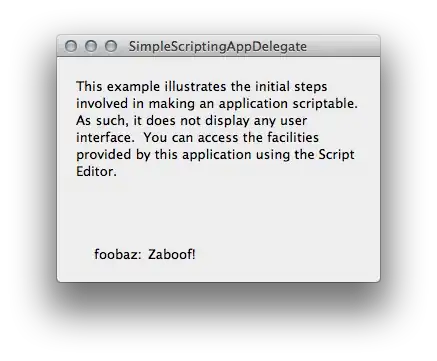
This setup allows you to get and set the custom foobaz property via AppleScript. Setting the value will cause the value shown in the foobaz: text field to change to the value you set like shown in the image below:
Sample project: SimpleScriptingAppDelegate.zip


