The Loki network is going to be upgrading to v4 in the coming week to prepare for RandomX mining and as a Storage Server for messaging. Currently I am on version 3. How do I update my Loki SN to get ready for this hardfork?
Asked
Active
Viewed 181 times

1 Answers
1
First login to your service node and make sure you are using the user that launches the loki-launcher. Following the guide: https://lokidocs.com/ServiceNodes/UpdateGuide/ -- My user is snode.
For those looking for a one liner, you can do this otherwise skip it:
$ su snode
$ loki-launcher stop; sudo npm install -g loki-launcher; sudo loki-launcher download-binaries; sudo loki-launcher fix-perms snode; loki-launcher start
Then make sure you stop the loki service using:
loki-launcher stop
If that doesn't work you can stop it like this too:
sudo systemctl stop lokid.service
Once stopped, we can proceed to update loki. First update loki-launcher using:
sudo npm install -g loki-launcher
Then update lokid binaries using:
sudo loki-launcher download-binaries
And make sure your permissions are fixed also by:
sudo loki-launcher fix-perms snode
To double check goto your folder:
cd ~/.loki
And see if any of the files or folders have root as the owner. If it does, change it to snode: sudo chown snode:snode < folder/file >
Now lets start your lokid: loki-launcher start
Then do a: loki-launcher client
Let it wait as it will have to scan the blockchain for the new version. My vps took about 10-15 mins to do the scanning. You should see this:
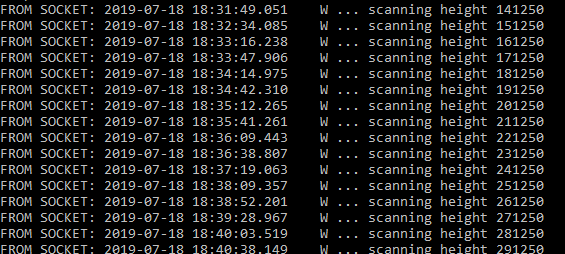
When done, you'll see SYNCHRONIZED OKAY
And check on your SN status with: print_sn_status
Next make sure your STORAGE SERVER is working. Just do a: loki-launcher status -- if it shows OFFLINE, you can try to launch it manually to see if its throwing errors like this: /opt/loki/bin/loki-storage 0.0.0.0 23023 --- I had the issue where it was showing OFFLINE, it was due to my ~/.loki/storage folder was owned by root. A chown to snode fixed it.
Also be aware of:
IP Address: 0.0.0.0
Storage Server Port: 0
Downtime Credits: 720 blocks (about 24.00 hours)
Its suppose to look like that as the fork hasn't happened yet.


Patoshi パトシ
- 4,608
- 4
- 27
- 69