I created my random numbers and I saved them into a txt file. My input file includes just 0 and 1. Here is the link of my file
And I of course read some answer before asking that question but I could not understand how can I create an input file for diehard. Do diehard have some prepared comment for converting our input file for itself or we should do it by hand? If we should do it how? I see too many parameters like generator see type count numbit ... Could you please help me?
Update: I actually answered this question but I have some troubles related my account so the answer is just lost so I am writing again
Many thanks for your answe rI think it finally worked with that
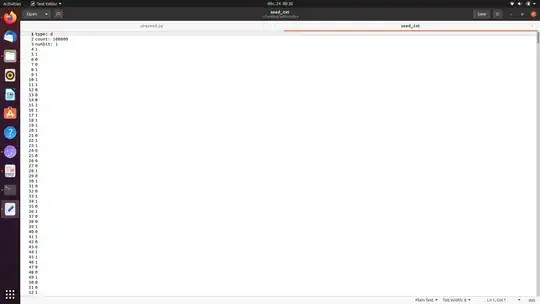
just to be sure: what is d? when I looked other example I sometimes saw b instead of d
I have just 0 and 1 so numbit should be 1 I guess, right?
and you wrote some numbers and they are actually random numbers right? (In my case it is jut 0 and 1 instead of 3129711816 85411969 2545911541)
And I want to test how much my numbers are random with this file and this code script right?
Also When I tried without changing my file as a header file, it worked with this code script: dieharder -a-f your-file.txt and what does thos script mean? OK it worked but I couldnt change my file like header file and I dont know what it means

Update-------------------------------------------------------------
Hello, I still have some troubles regarding matching of accounts so I am updating here
1)Happy Christtmas to you too!
I have not a bin file! Why do you think that. I am trying to produce quantum random numbes and my numbers will be either 1 or 0 and after producing them, I save it a txt file! WHat is the problem with txt file. I really dont understand your point. And studyong with diehard how many numbers should I have at least? 2000000 is not enough?? What are the other techniques
2)And can you please explain my questions, if you have seen them like what is d or is my header file correct?...
3)How can I convert my txt file as a binary file???
4)What is the other techniques for testing how much my numbers are random? Can NIST be ok?
5)For instance I used this line for converting bin file perl -ne 'print pack("B32", $_)' < instructions.txt > instructions.bin is that ok? And I used 10000000 data and I convert it as binary file and it was extremely fast. I think it should has been slow?
Important note: I am using dieharder 3.31.1 version


