5

I read something the other day about a guy who found a way to knock over completed prints with the printer head itself, then slide them to the edge of the build plate, where they fall into a box/basket. This allows printing several Eiffel Towers while you sleep for example. It doesn't work with skirts (duh), and the adhesion has to be just right not to wake up with a pile of spaghetti, but it still sounds useful.

Well, now I cannot re-find the description I read; does anyone know what this process is called? Is there an easy way I can perform such an end-of-print action on my CR-10 with a cura plugin? If such a thing takes a touch of end-time custom gcode, is there a proof of concept rough draft or demo I can start tinkering with? Any more info is helpful.

dandavis
  • 225
  • 1
  • 7

4 Answers4

5

You could cool down the heated bed (with e.g. [M109][1] R28) and cool down the hotend (with e.g. [M190][1] R40). This will usually release the print from the plate, perform the actions to move the head (e.g. go to the largest X, Y position G1 X{max} Y{max}, move down G1 Z10 to then move to minimum X, Y G1 X0 Y0 position such that it sweeps the print to the origin) that it knocks it into the basket and start printing again by copy pasting the whole G-code beforehand a couple of times. Note that this all depends on the product you are printing. You should at least use the end code scripts for the specific tasks to cool down, and start scripts to heat up again.

You can write a Cura plugin to implement a new GUI item to copy the G-code multiple times or create a post processing plugin.

0scar
  • 37,708
  • 12
  • 68
  • 156
3

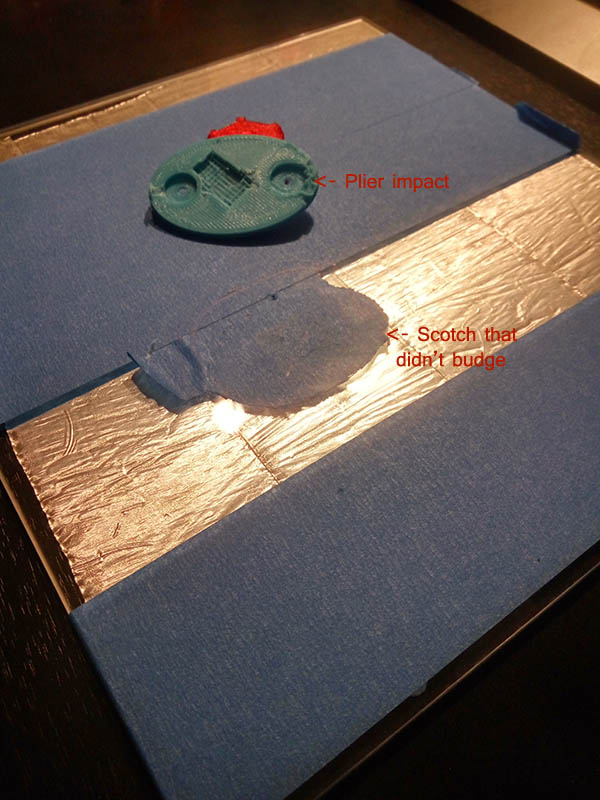
I would advice against it, or at least have some detection for when the object won't budge:

Print damaged by impact

Leaving a printer unattended needs special care too (fire alarm springs to mind but not only).

Greenonline
  • 6,748
  • 8
  • 40
  • 68
Valmond
  • 914
  • 1
  • 8
  • 15
2

Another method - shake it off

Taken from Automatic 3D Print Removal using G-Code, by Make Anything

In order to shake the completed print from the bed, you can use an ending script, like so:

Screenshot of ending script

See the video at 2:45 for an explanation of the scripts, both starting and ending. Note that the starting script does not include a wipe (for purposes of a purge), as a brim is used, which acts as a purge.

The code is:

G1 X105 Y195 Z50 F3000; Move up and back

; Make some (alert) sounds M300 S3520 P200 ; A7 M300 S4698.63 P200 ; D8 M300 S5274.04 P200 ; E8 M300 S6271.93 P200 ; G8

G1 X105 Y195 Z1 F3000 ; Lower G1 X105 Y1 Z1 F2400 ; Remove print G1 X105 Y30 Z1 F8000 ; Shake it out G1 X105 Y1 Z1 F8000 ; Shake it out G1 X105 Y30 Z1 F8000 ; Shake it out

;M106 S0 ; Turn off fan ;M104 S0 ; Turn off extruder ;M140 S0 ; Turn off bed ;M84 ; Disable motors

The guy is using an Anycubic i3 Mega, but this technique should work with most other printers.


A note on the motor sounds

With respect to the alert sounds at the start of the ending script, there is a video for making the motors emit sounds and tunes, see I Taught My 3D Printer How to Sing ( and Dance! ) - using G1, G4 and, principally, M300.

An example can be seen here, the mii channel theme but it's played using a 3D printer ♪ ♫.

See also Writing G-code: Audible Alert at end of print.

Greenonline
  • 6,748
  • 8
  • 40
  • 68
0

For fun, from Thingiverse - Automatic Print Ejector - The Punching Machine.

There's even a video: MatterHackers Punch-Out!

Hover for a (slightly annoying) image:

Punch-Out

Greenonline
  • 6,748
  • 8
  • 40
  • 68