I was having some issues with printing, most noticeably in this picture:
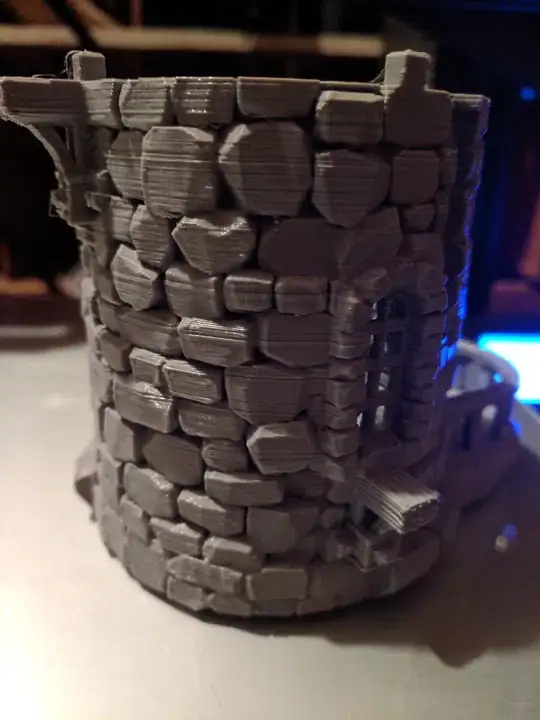
The layers are very noticeable and sometimes have gaps, and the overhangs don't print very well (although the former is more of an issue). I just calibrated my E-steps so I don't think that is the issue. It was doing the same thing before I upgraded anything (i.e., I had issues on stock hardware).
My printer is an Ender 3 with the metal extruder upgrade (which replaces the plastic parts as seen here), an E3D v6, printed fan duct (Bullseye), glass bed, BLTouch, and vanilla Marlin. Pictures of it are also in the below album. The printed upgrades were printed on a Prusa MK3S and don't have the same issue.
I am using Hatchbox 1.75 mm gray PLA, printed at 215 °C with my bed at 60 °C. I am using Ultimaker Cura 4.1 but was also having the problems on an older version of Ultimaker Cura (maybe 3.6, but I can't remember which it was). The problems also existed with some Hatchbox 1.75 mm black PLA but I used the same roll on my Prusa MK3S without any issues, so I'm not sure if filament could be the cause (although it is a different printer so it's still a possibility).
I have tried at different printing speeds and the problem still persists.
I also recently tried varying the temperature during printing (first up to 222 °C then down to 200 °C) with no noticeable difference.
Extra pictures here.
Model is part of Printable Scenery's sorcerer tower.


