5

I've been trying a lot of different things to combat corners curling upward in the first few tens of layers after the bottom skin. To be clear, I'm not talking about corners of the first layer printed on the bed, but rather the points of the outline in layers above the base where direction of print motion changes discontinuously (discrete corner) or abruptly (turn with very tight curvature). Here's an image I found (not mine) that demonstrates:
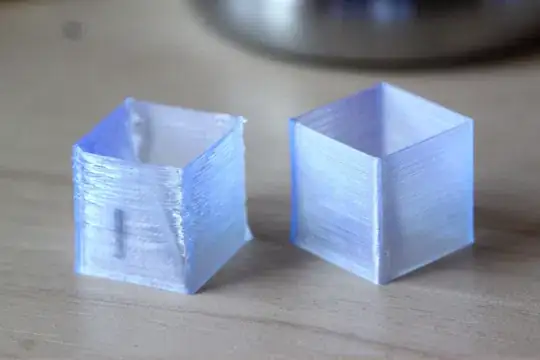
print with curled corners next to one without

And a pic during print of the type of curling I'm talking about:
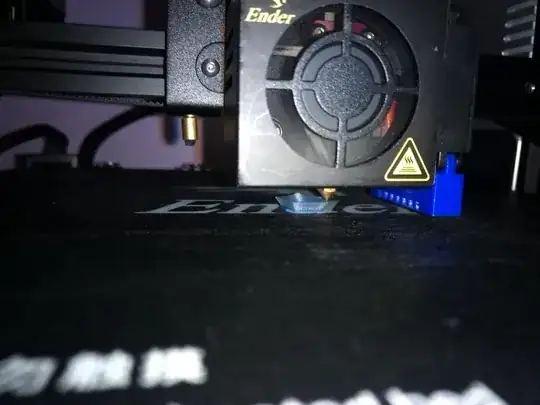
curling corners during printing

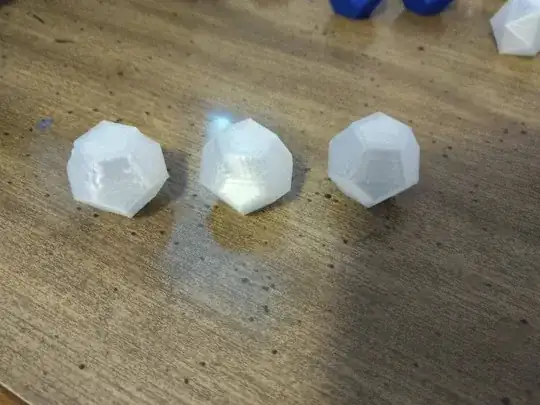
And some previous worse prints:

2 dodecahedra with very warped edges, one with minor distortion to one edge, shown bottom-up

My go-to worst test case for this now is a 20mm tall hollow dodecahedron with 0.8mm shell (hollow geometry, not just empty infill; 0% infill on a non-hollow model does even worse, shown above). For everything else I've tried, I've mostly been able to sovle the problem with combinations of

  • Improved cooling fan duct
  • Lowered bed temperature or unheated bed (but this is a tradeoff; it seriously hurts first layer quality and increases risk of non-adhesion)
  • Disabling Cura's overhang detection mode (non-uniform print speed causes a huge increase in the curling due to latency of extrusion rate response)
  • Increasing motion acceleration limits or decreasing speed limits (also mitigating the latency in extrusion rate response)

but I can't get all 5 edges of the worst-case dodecahedron completely warping-free without just heavily slowing down the print; during print it's obvious that the curling at the corners in each layer is the source of the warping. Increasing Cura's cool_min_layer_time to 10 seconds (default is 6, and I usually get by fine with 3-4.5 for most things) mostly but not entirely solved it, and going much slower than that seems likely to introduce other surface artifacts from extremely slow extrusion.

Are there any additional tricks I'm missing for solving this? I'd like something that's easy to leave on all the time or at least to automate, as opposed to hacks like adding in a junk tower off to the side to waste time between layers.

My printer is an Ender 3 with stock gear except for improved fan duct. The problem was worse with the stock fan duct.

2 Answers2

4

Cura has an additional setting that you can make visible called "Lift Head". My recommendation is that you do the following:

  1. Set your minimum print speed to something actually reasonable like 30mm/s or higher. Printing too slowly negates the following two settings and is not beneficial to printing small features.
  2. Set your minimum layer time to something higher, like 15s or so. The slower you print, the higher this number needs to be. Using too small of a minimum print time prevents adequate layer cooling.
  3. Enable "Lift Head". This must be used to allow the small features on your print to properly cool. Without the "Lift Head" setting, your nozzle will remain parked on your print and provide both radiant and convective heat which prevents cooling and causes sagging of small features.

The combination of these settings will rapidly deposit the layer, then move the nozzle high and away from the print until the minimum layer time is reached, such that the radiant heat from the nozzle doesn't continue to heat the soft PLA while it's trying to cool.

Enabling all three is how I got perfect tiny features on all of the printers here at my office - a fleabay i3 clone, an Anet A8, and a couple Monoprice printers of various levels.

Edit:

I forgot to mention, keep your bed temperature at a reasonable setting too. For PLA, normally people may recommend up to 70C, but realistically, for very small prints, you can keep your bed much colder without detrimental effects. For tiny items, my PLA prints used to use a bed temperature of about 30-40 C depending on the specific filament. Very tiny prints are unlikely to warp even with a cold bed.

Basically, the colder the bed is, the less heat is getting conducted up through the print to the top layers that are molten, and the faster those layers cool. Keep the bed temp down and it'll benefit your layer cooling.

Nach0z
  • 921
  • 6
  • 11
4

While I tried a lot of things to solve this, including tuning temperature, fan, speed, etc., ultimately the single biggest factor that causes or prevents it is the state of Cura's Outer Before Inner Walls (outer_inset_first) option. With outer walls first, I don't have the problem at all. With the default (inner walls first), I have it to varying degrees depending on geometry and a lot of other factors.

I don't have a good explanation for why this happens so I'm asking a new question about it.