33

To find the intrinsic and extrinsic parameters, I calibrated it and the software gave me the extrinsic parameters as a 4 x 4 matrix. This seems to be a 4x4 homogeneous transformation matrix.

The values are as follows:

$$ \left( \begin{array} 0.211 & -.306 & -.928 & .789 \\ .662 & .742 & -.0947 & .147 \\ .718 & -.595 & .360 & 3.26 \\ 0 & 0 &0 & 1 \\ \end{array} \right) $$ I also have the intrinsic parameters of the camera like focal length, principal point, skew, distortion coefficients, etc.

How do I extract the camera position and rotation in world coordinates using this matrix?

EDIT:

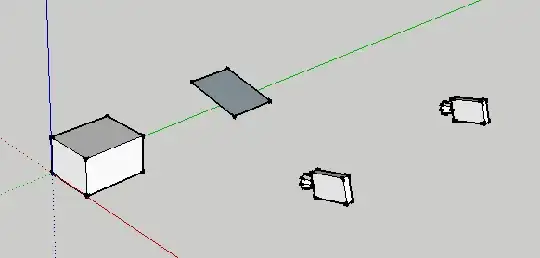
cam image

On the left, I have shown a cam and its viewing a 3d object, and I take a photo of this 3D object from the cam. The right is what I want. I want to get the world position/rotation of the cam and the world position/rotation and actual size of the image in 3d space.

Milan
  • 117
  • 4
    The top 3x3 block is the rotation, and the right column is the translation. I can't say more without information about what this matrix is suppose to be: the map from some reference pose of the camera to its current position (and what is that reference position?) The inverse of this map? – user7530 Nov 16 '11 at 06:59
  • 1
    From http://en.wikipedia.org/wiki/Camera_resectioning I found that this is an matrix for extrinsic parameters of the camera. It consists of R and T. It says that the camera position can be found by using C = -R' . T Don't know if thats the way to go? – Kevin Boyd Nov 18 '11 at 05:58
  • Think of the right camera as a projector: it shines an image onto whatever surface it is pointing at. There is no "actual size" of the image it is projecting: move the screen closer and you get a smaller image; farther and you get a larger one. You can measure the distance from the left camera to the left box, and the put the screen at the same distance on the right; but to do this, you need to know the position of the left camera (see my answer below) and the position of the box. The position of the box in world coordinates is not something you can infer from your matrix, or the image. – user7530 Nov 21 '11 at 11:35
  • Here's a question that might clarify what you want: suppose, instead of the box on the left, there's a person in the foreground and the Eiffel Tower in the background, so that both the person and the tower appear the same height in the 2D picture captured by the left camera. What do you expect to see on the right? – user7530 Nov 21 '11 at 11:44
  • @user7530 Hello user! What you say seems make some sense. Since I have other details like Focal length, principal point and also exif data save in the image along with the camera matrix isn't this sufficient information for getting the details. I'm the dumb guy here so I don't know what is possible and what is not. I had posted a question here and as per the images those guys seem to be get something close to what I want. – Kevin Boyd Nov 23 '11 at 11:13
  • Unfortunately these intrinsic parameters still aren't enough to tell you the position of the box. (Notice that in the SO question and answer, the position of the corners of the plane in world coordinates is exactly known.) – user7530 Nov 23 '11 at 11:35
  • @user7530 any idea of a process or algorithm that would get the position of the box? What additional steps would I have to do to gather the box position data? – Kevin Boyd Nov 23 '11 at 15:58
  • A nice explanation here as well:

    http://homepages.inf.ed.ac.uk/rbf/CVonline/LOCAL_COPIES/MARBLE/high/pose/express.htm

    – Mircea Feb 12 '19 at 13:25

2 Answers2

31

Assuming your matrix is an extrinsic parameter matrix of the kind described in the Wikipedia article, it is a mapping from world coordinates to camera coordinates. So, to find the position $C$ of the camera, we solve

$$\begin{align*}0 &= RC + T\\ C &= -R^T T \approx (-2.604, 2.072, -0.427).\end{align*}$$

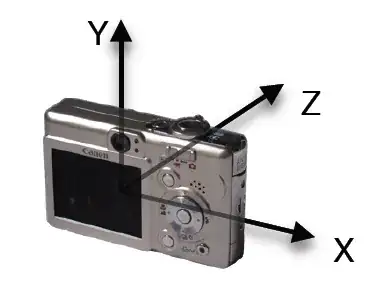
The orientation of the camera is given simply by $R^T.$ So if the "in" axis is the z-axis, for instance, then the vector pointing in the direction the camera is pointing is

$$R^T \left[\begin{array}{c}0\\0\\1\end{array}\right] = (0.718, -0.595, 0.36).$$

user7530
  • 50,625
  • Excellent answer, user7530, I didn't understand the "in" axis part. Another question once I draw the camera position in 3D space I would also like to draw the actual image and its location and angle in 3D is that possible using the matrix? – Kevin Boyd Nov 20 '11 at 08:18
  • There are three axes in the camera's coordinate system: left-right, up-down, and into the picture. I am assuming that $z$ is the "into the picture" axis (i.e., that the camera is looking down the z-axis.)
  • I'm not sure what you mean. You want to take what the camera sees, and project this 2D image onto a 2D "canvas" in the 3D scene?
  • – user7530 Nov 20 '11 at 08:29
  • I've edited my question. I hope the image explains it better now. – Kevin Boyd Nov 21 '11 at 11:13
  • Thank you very much for your response. What do you mean with "in" axes? I'm using a right handed reference XZY where Z is the Up direction and I'm not able to get the orientation to work correctly by using R_transpose .. am I doing something worng? – rkachach Oct 16 '18 at 12:37
  • could you please also look at this – user0193 Jun 10 '21 at 15:29