7

I'm having a lot of difficulty removing support material without damaging the print.

Support material Support marterial

Are there any tips/tricks to doing this or is it just a case of sanding, cutting, chopping and then cleaning it up as best I can?

Settings

  • Printer: Monoprice Ultimate
  • Filament Temp: 200 °C
  • Plate Temp: 60 °C
  • Material: PLA
  • Slicer: Ultimaker Cura
    • Placement: Everywhere
    • Angle: 20°
    • Pattern: Concentric
0scar
  • 37,708
  • 12
  • 68
  • 156
BanksySan
  • 550
  • 2
  • 9
  • 20

5 Answers5

6

Print/material specific settings

If you are printing too hot with too less distance, the support just fuses to the print object. Extra cooling, lower print temperature and support distance should be in balance to create easy to remove support structures with respect to an acceptable print object surface. If temperature and cooling cannot be balanced to prevent fused support structures (e.g. for high temperature filament materials that cannot take too much cooling as that would result in less structural solid prints), there is an option in Cura to override the fan speed for the first layer above the support (Fan Speed Override). If this fails to produce easy removable supports, you can resort to changing the support distance between the support and the print object.

Support settings

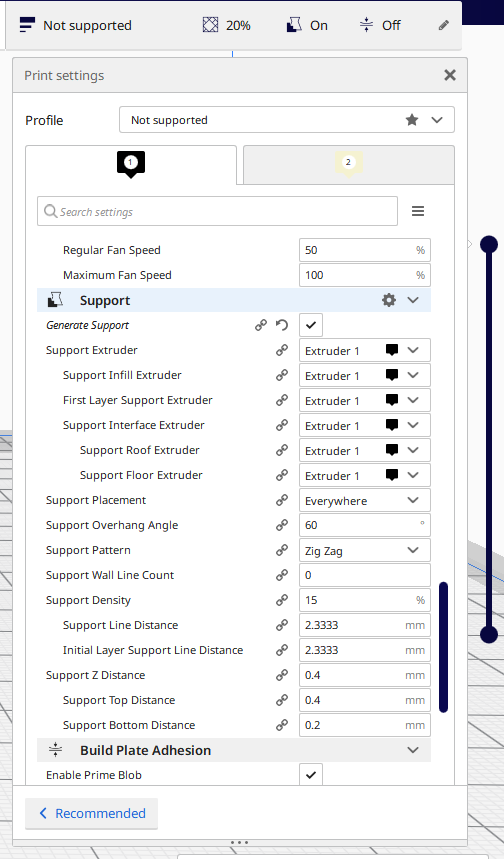
Most of the used slicers have an option to determine how much distance (in terms of layers) you want between your support and your product, you could add an extra layer as space to try out if that works better for you. E.g. the default Cura setting for Support Bottom Distance (which is a sub-setting of Support Z Distance) is the layer thickness specified in Layer Height. If you have a layer height of 0.2 mm, the Support Bottom Distance is also 0.2 mm. For the top, option Support Top Distance this is two layer heights, so 0.4 mm in this example. These options are visible in the expert mode, you can search for them in the search box, see image below.


Why should you want air in between your part and the support?

You'll soon find out when you want to remove supports, if no gap is used, the support will fuse to the print part. This is only interesting (no gap between print part and support structure) when you use a different filament for support like PVA or break-away filament; e.g. PVA dissolves in water in a dual nozzle printer setup (not that you can make the biggest part of the support except the top and bottom layer from the print object material, e.g. PLA for the main part of the support and PVA for the bottom and top layer: settings First Layer Support Extruder, Support Interface Extruder, Support Roof Extruder and Support Floor Extruder).

enter image description here

0scar
  • 37,708
  • 12
  • 68
  • 156
2

Test out a couple different types and z distances. I've found that the 'lines' type on Cura turns out very well - they are generally easy to remove and leave few artifacts on the part. Some types of support I've found to be much more difficult to remove than others, I would recommend 'lines' or 'zig zag'. See the link at the bottom for all possible values.

Z distance

Beyond switching over to 'lines' instead of 'concentric' this is the one that I've found has the most impact on the how easy it is to remove supports. You want this to be as large as possible while still providing sufficient support. Do a couple test print, increasing this value until the detail start to get bad, then lower it just a bit.

Current link for Cura setting explanations

https://ultimaker.com/en/resources/20422-cura-support-settings

1

It’s possible to use a heat gun to smooth it off after removing the majority of the supports. It creates a glossy effect as well.

Tim Li
  • 164
  • 1
  • 7
1

Changing slicer settings will ultimately help with future prints, but there is a tool that has been an absolute god send to me for cleaning up hard to clean up prints.

Deburring tool

Please, go pick one up. You won't regret it. They make life so much easier to clean up prints from hard to clean up materials.

Greenonline
  • 6,748
  • 8
  • 40
  • 68
0

It is recommended that you try "tree support" in the "experimental" module of settings.Also,before removing the support, blowing with a hot air gun to soften the support material connected to the model may achieve good results.

gailulun
  • 1
  • 1